


Smart Pill Identifier
3.6376.00 Reviews
App Specs
- Version
- 3.0.2
- Updated On
- License
- Free
- Downloads
- 100,000+
- Developer
- BuildLoop
- Categories
- Medical
- Platform
- Android
Screenshots

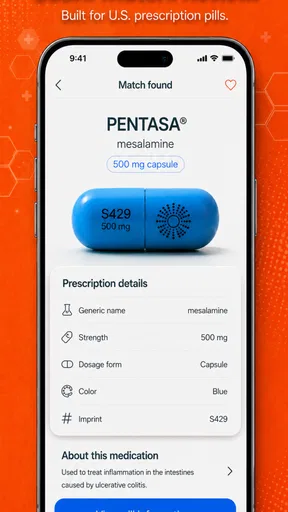
 Analysis by AppCompare
When I come across an unidentified tablet, I want a quick clue, not a reason to guess what someone should take. That distinction matters with Smart Pill Identifier: it can help narrow down what a pill might be, but I would treat any match as a starting point for checking, not as proof of its identity or a medical recommendation. For a free medical app from BuildLoop, it offers a handy first step, provided you use it with sensible caution.
Free to start, with optional paid purchases
The app is free to download, so you can try its identification tools without paying upfront. It also offers in-app purchases ranging from $4.99 to $99.99 per item. I’d look at the purchase details inside the app before spending anything and decide whether the free experience already covers the occasional lookup you need. The price range alone doesn’t tell you which purchase is right for you, so there’s no reason to treat payment as necessary just to begin.
That makes its value fairly straightforward for someone who only needs an occasional reference: you can first see whether its camera and manual search fit your routine. If you expect to use it often, consider the paid options only after checking what they actually unlock and whether that benefit matters to you. I wouldn’t pay simply because the subject feels important; for medication decisions, a pharmacist or clinician is the more appropriate source of confirmation.
Getting Started with Smart Pill Identifier
Ever found yourself staring blankly at a mysterious pill and wondering what on earth it could be? Well, join the club! We’ve all been there, and that’s where the Smart Pill Identifier app steps in to save the day. I’ve been playing around with it for a bit, and let me tell you, it’s like having a mini pharmacy expert in your pocket.
First off, let’s talk about the setup. Downloading and installing the Smart Pill Identifier is as straightforward as it gets. Available for both Android and iOS, the app is quick to install and doesn’t bog you down with unnecessary permissions. Just fire it up, and you’re ready to roll.
Once you open the app, you’re greeted with a clean and user-friendly interface. I loved how intuitive it is – no need to dig through endless menus to find what you’re looking for. The main screen gives you the option to either scan a pill using your phone’s camera or manually enter the pill’s characteristics. Super handy if you happen to be offline or in a low-light situation where the camera might struggle.
Features that Stand Out
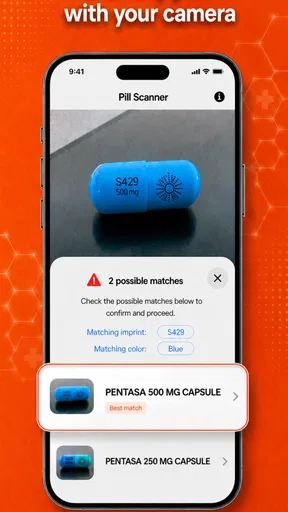
So, let’s dive into what makes this app tick. The standout feature has to be the camera pill identification. You simply point your camera at the pill, and within seconds, the app works its magic to identify it. It uses an extensive database to cross-reference the pill's shape, color, and imprint. Imagine the time saved not having to scroll through countless images online!
Worth Reading Before You Choose

EA SPORTS FC Mobile 26 Is a Bigger Football Game, but It Takes Time

Flipboard Shows What News Apps Must Do Beyond the Feed

Switching to Android Auto Means Rethinking Your Driving Routine

Google Calendar Makes a Crowded Week Easier to Manage

Ludo King Makes the Most of the Minutes Between Plans

Baby Panda World Brings Quick Play to Modern Phones, but Its Game Library Feels Busy
Another nifty feature is the manual search. If the camera doesn’t quite hit the mark, you can enter the pill’s imprint, color, and shape manually. The app then provides a list of possible matches. It’s like a detective hunt, but for pills. I found this feature particularly useful for those less common pills that might not immediately register with the camera.
Using a match responsibly
A practical way to use the app is to pause before searching and record what you can see: the full imprint on both sides, the tablet’s color, and its shape. Then check the candidate matches against all those details rather than stopping at the first result. If an imprint is partly rubbed away, or the pill is split, damaged, or difficult to photograph, I’d treat the result as especially uncertain. A close visual resemblance is not enough to establish that two pills are the same.
For example, imagine finding a loose tablet while sorting a family member’s medication. I’d keep it separate from the organized doses, use the manual fields to describe it, and compare any suggestions with the labeled container or ask a pharmacist. I would not put it back into a pill organizer based only on a camera result. That small extra step is more useful than rushing through the scan, particularly when someone else may later rely on the identification.
The manual route is also worth trying when a photo gives an unclear result: it lets you focus on the identifying details you can actually read instead of repeatedly taking pictures under changing light. Good lighting and a plain background can make the visible shape and imprint easier to inspect, but they cannot fix a missing or unreadable marking. If the details don’t line up or the app offers several plausible candidates, stop there and get professional confirmation.
Where it fits among other options
Compared with a general web search, a dedicated pill identifier gives you a more focused way to work through shape, color, and imprint instead of sorting through unrelated pages and pictures. That focus can save time when you have a clear, intact pill and want to investigate a possible match. The manual search is a useful fallback when camera recognition is uncertain, rather than a reason to accept a result without checking it.
Compared with asking a pharmacist, though, the app is a convenience tool, not a replacement for a person who can assess the pill and the medication context. A pharmacist is the better choice if the tablet is damaged, the imprint is unclear, the suggested identity conflicts with its packaging, or the question involves whether someone should take it. I see the app as most useful for organizing a question before seeking help, not settling a high-stakes decision on its own.
A Few Quirks
Now, no app is perfect, and the Smart Pill Identifier is no exception. While the camera feature is generally spot-on, it can sometimes struggle with pills that have faded imprints or are unusually colored. In these cases, the manual search becomes your best friend. Also, while the app doesn’t bombard you with ads, there are occasional prompts for the premium version. Not a dealbreaker, but something to be aware of if you’re not looking to spend.
The key limitation is not just image quality; it is the risk of overconfidence. A camera can make a search feel definitive even when several pills look similar, and a manually entered description can be incomplete if a marking is hidden or worn. I’d avoid using the app to identify a pill for immediate use when you can’t verify the result independently. If it is an unknown tablet, keep it apart from other medication and ask a pharmacist or clinician rather than relying on a visual guess.
User Experience and Interface
One of the things I appreciated most is the simplicity of the app’s design. It’s clear that a lot of thought has gone into making it as user-friendly as possible. The interface is clean, with a minimalistic design that ensures you’re not overwhelmed with information. It’s perfect for users of all ages – whether you’re tech-savvy or just starting out.
The app also includes a handy FAQ section and customer support that’s responsive and helpful. If you ever find yourself stuck, help is just a click away.
Smart Pill Identifier is rated 3.8 from 879 ratings, with 347 written reviews, and has passed 100K installs. Those figures suggest it has found an audience, though they aren’t a substitute for checking whether the app’s results suit your own needs. It is rated for Everyone, and version 2.9.5 runs on Android 6.0 or later. The app’s release date was February 17, 2019, so I’d keep it updated when an update is available rather than assuming an older installation will behave exactly like the current version.
Who is likely to get value from it?
I can see the app helping caregivers who occasionally need to investigate a loose pill, or adults who want a quick reference while sorting medication at home. It may also be useful when you have a tablet but cannot immediately locate its packaging, as long as you use the result to guide a follow-up check. Its strongest everyday role is narrowing the search, especially when the pill is intact and its markings are legible.
It is less suitable for anyone looking for a medication schedule, advice about dosage, or a way to decide whether an unknown pill is safe to take. It is an identifier, not a personal medication manager or a substitute for medical advice. If your main need is to keep track of prescriptions, a dedicated reminder or medication-management tool is a better fit; if you need certainty about a pill, speak with a pharmacist or clinician.
Conclusion: A Must-Have for Peace of Mind
In conclusion, the Smart Pill Identifier is a game-changer for anyone who frequently deals with medications, whether you’re a healthcare professional, a caregiver, or just someone who wants to stay on top of their prescriptions. It brings a level of convenience and peace of mind that’s hard to beat. While it has its quirks, the benefits far outweigh the occasional hiccup.
So, if you find yourself needing to identify pills regularly, give the Smart Pill Identifier a spin. It’s like having a personal pharmacist right in your pocket, ready to help at a moment’s notice. Happy identifying!
My bottom line is that the free download makes it reasonable to try if you want a focused visual and manual lookup tool, and its optional purchases are worth considering only after you understand what they provide. I’d recommend it as a convenient first check for a clearly marked pill, not as the final word. If your situation calls for dependable identification before someone takes a medication, skip the guesswork and contact a pharmacist or clinician.
Pros
- User-friendly interface for easy navigation.
- Comprehensive database of pills and medications.
- Quick identification via pill image capture.
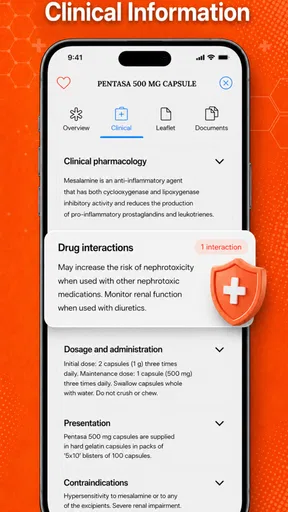
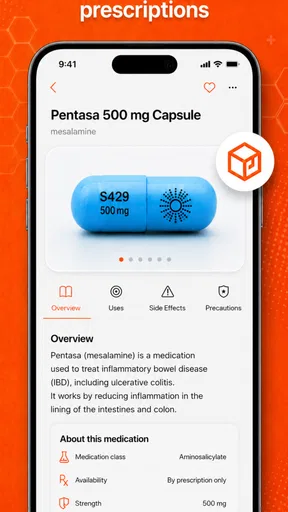
- Detailed information on pill usage and side effects.
- Regular updates ensure current data accuracy.
Cons
- Limited offline functionality without internet.
- Occasional slow image processing time.
- Requires camera access for pill identification.
- Some rare pills may not be recognized.
- Ads may interrupt or distract users.
FAQs for Smart Pill Identifier
What is the Smart Pill Identifier app and how does it work?
The Smart Pill Identifier app is designed to help users quickly and accurately identify pills based on their appearance. By using your device's camera, the app scans the pill and matches it to a database containing thousands of medications. This makes it an invaluable tool for healthcare professionals and patients alike.
Is the Smart Pill Identifier app free to use?
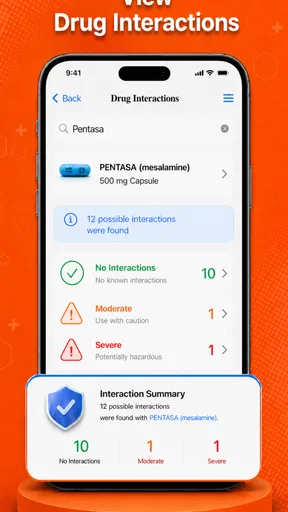
The Smart Pill Identifier app offers both free and premium versions. The free version provides basic pill identification features, while the premium version includes additional features like detailed drug information, potential interactions, and personalized medication management tools. Users can choose the version that best suits their needs.
How reliable is the pill identification feature of the app?
The app uses advanced image recognition technology and a comprehensive database to ensure accurate identification of pills. However, it is always recommended to double-check with a healthcare professional, especially for critical medications, as lighting and camera quality can occasionally affect accuracy.
Can the app provide information on drug interactions and side effects?
Yes, the premium version of the Smart Pill Identifier app offers detailed information on drug interactions and side effects. This feature helps users understand potential risks and allows them to make informed decisions when managing their medications. Always consult with a healthcare provider for personalized advice.
Is the Smart Pill Identifier app available for both Android and iOS devices?
Yes, the Smart Pill Identifier app is available for download on both Android and iOS platforms. Users can easily find it on the Google Play Store and the Apple App Store, ensuring accessibility for a wide range of devices. Ensure your device meets the app's system requirements for optimal performance.


